Which method is best for Ecommerce Marketing?

Want to know what works today to get more audience for your ecommerce store? I am sure you could be more excited to know what methods of Marketing really works today from these two,
  1. Inbound Marketing
  2. Outbound Marketing
I have just got an excellent infographics on the Rise of Inbound Marketing from Pinterest, which was originally shared by Bridget Sprague and I have re-pinned.

Let's take a look:


That's all....!!

How SOPA can affect an ecommerce store

People are in the support of anti-SOPA movement. Until, this anti-Piracy bill passes, I erge people to support continue. It may affect to almost all forms of online sources such as your website, blog, ecommerce store, social networks, forums, portals etc. People are thinking that they are getting restricted. It does not mean that they can not share their photos, music, video and other forms of content but it can be censored by the SOPA and PIPA.

Let's take an example, I own an E-commerce website that provide goods and services to the users in United States then, this Ecommerce website should be passed under SOPA to check if it does not break the rules or regualtions of SOPA.

So, can anyone has more ideas that how it could affect an E-commerce website if it passes?

Like this story in Reddit here, http://www.reddit.com/tb/on3zr if your are in the support of anti-SOPA movement.

Social Search Engines and Ecommerce Store

Personalized Search Engine – a new era of Search Engine begins: 
Recently, Google has transformed its search engine to social search engine or personalized search engine or an integration of the Google+ into Search engine. Search result has now being influenced by the interest of people, their preferences, photos and posts shared in their Google+ page or profile when they have signed-in. Therefore, it is now being logical the previous statement made by Google when they have released the encrypt version and blocked all organic (signed-in) search queries from Google Analytics and said this is because of the privacy as it was the part of this new integration of Google+ to search.After a series of enhancements in Google search engine as seen below, it is now being confirmed that People can see list of publically shared results of whom they are following or those who are in their circles – if he/she is being search something after signing on Google+.
  • Google Instant
  • Place Search
  • Instant Previews
  • Social Search Update
  • Recipe View
  • Google Profile Enhanced
  • +1 Button
  • Search by Image
  • Flight Search
  • Personal Results
  • Profile in Search
  • Related people and page
You can find more information on last three search engine updates in this post, [Search, plus Your World] and all other updates here.

On the other hand, make sure, if you have heard about Google’s Custom Search Engine, then it is used in websites as a site search tool powered by Google.

Personalized Search Engine and E-commerce Store:
Guess you are an online retailer and selling branded and designer Sunglasses over your ecommerce store and struggling with getting potential customers – a solution is to have the Google+ page for your ecommerce business. The community is behind on the most search queries, therefore if you have signed-in your G+ page and have huge following and followers, you may discover the personal results, posts, photos, meaningful conversation from their profile to search engine on the topic you are interested in a way it wasn’t possible before.
You are selling Sunglasses, you can find what people are talking about Sunglasses, what they like, dislike, suggesting people and pages may enable you to follow or add them into your circle. You can also search profile of people or pages directly into the search box auto complete whether he/she might be interesting for you to add or not.

Of course, there are some other ways to promote ecommerce store into Google’s personalized search engine – share your views and ideas on this topic via comments.

Shopping Cart Abandonment - How to avoid this

When I was exploring the web to find out the infographics and resources on Shopping cart abandonment, my search was ended with this excellent infographics, which basically focus on checkout page of an ecommerce site that how you can improve this page so that it will help you  (as an online ecommerce store owner) to decrease a shopping cart abandonment rate and what you can Do's and Don't.

Here is the infographics:


source:http://bit.ly/upeuNo

Top 10 Blog Posts on Ecommerce in 2011

I remembered those days when I have published first blog post [Ecommerce - Most Cost effective and efficient Small Business Solutions] in the middle of January and since then, I have never looked back to find out news and information about Ecommerce and the use of various ways of Search Engine Optimization for promotion.
Thanks to all the readers of this blog who have participated in the one or another way to this blog.

Today, I want to share with you some of the best blog posts on Ecommerce and SEO of the year 2011,

Global:
  1. 20 ways to get reviews from customers
  2. 5 Holiday Marketing Ideas to Boost Sales
  3. PHP Ecommerce Shopping Cart Features
  4. Five tricks our minds play on us and what marketers need to know
  5. Customizing eCommerce Store with Shopping Cart & Checkout Features
  6. How To Use Cross-selling And Upselling To Maximize Online Sales
  7. Technological Impact Overturns Ecommerce Marketing Concepts
From this blog:
  1. Ecommerce Shopping Cart is a Heart of an Online Store
  2. Selling Products Online via E-commerce Store
  3. Increase traffic to your store with Google Product Search
Let’s have celebration for 2012 in advance...!

Increase traffic to your store with Google Product Search

Online retailers, merchants, sellers, ecommerce store owners - attention please!
Do you have thousands of products in your stores? Are you worrying astir to sell them across the web? I am sure; many of you have been disappointed through poor online marketing and SEO activities, and even if they have been worked, it assists you to just getting traffic for limited products only. Numerous products are still impending in your stores, which have no visits at all.  So, what will be the solution? How to get traffic and sales for those products will be the main concerns for the sellers.
Yes, you come to the right place, customized-ecommerce.blogspot.com and time. The solution is Google product search engine, which helps shoppers find and buy products across the web. As a seller, you can submit your products to Google Product Search, allowing shoppers to quickly and easily find your site.
Ok, where do you find Google product search? Just navigate through (Google.com). For an instance, search “alain mikli eyewear” without quotes. Let’s find this, “shopping results for alain mikli eyewear” on Google SERP page.This could be something like,
 
Please note that the “shopping results” may only display the products on Google.com, depending on your items' relevance.
It will be easier to understand if you navigate though one of the products under the shopping results. Let’s go for the first one. Now, you are on the “shopping results” page. This page will display all the products similar to the query.
Now, click on one of these products, which will take you to the google.com/products - “Google Product Search” page. You can compare product prices; find all online stores selling the same products, list of other related products and some more details of this product. You can even filter, which store is offering a free shipping.
Let’s quickly go through the benefits of submitting products:
  • Inclusion of your products is completely free.
  • It helps shoppers find and buy products across the web.
  • It connects your products to the shoppers.
  • Helping you drive traffic and sales.
  • Depending on relevancy your product may appear on Google.com
How to submit products to Google Shopping:
Google currently offers two main options to submit your products information.
Data feed: Create an XML or a single tab-delimited text data feed, which contains all the product information, which are mandatory and recommended by the Google. You can send them through Google Merchant Centre account, or by using FTP.
API: Learn more about using the Content API for shopping here.

Selling Products Online via E-commerce Store

Hundreds of the way on hand for selling the products or services online and two modes you can go for - build a custom ecommerce website that entirely managed by you or use the capabilities of storefronts, such as eBay Store and Amazon web store with least efforts, make sure some of the stuff that you may not customize.
Today, three ways you can sell your products online – Through,
  1. Third-party retail e-commerce sites
  2. Integration of Shopping cart software to your existing ecommerce site
  3. Creating and managing fully integrated online ecommerce store
Let us start with first –
1. Third-party retail e-commerce sites:
The best advantage you can get is that you do not have to build and maintain your own ecommerce store - the eBay store design and Amazon web store are the examples of these. Moreover, you have an access of intended shoppers who already search for the products on such stores - eBay or Amazon.
2. Integration of Shopping cart software to your existing ecommerce site:
Do not fret if you are not friendly with programming and all that. This alternative is best for the existing ecommerce storeowner who runs a store with simple product's lines. External shopping cart software can benefit them by simply adding it although buy buttons. Shopify is a leader in this option. The major advantage is that it easily merges with your existing ecommerce website and simplifies the technology with the ease of enabling you to place a storefront within the current framework of your website.
3. Creating and managing fully integrated online ecommerce store:
There are two leaders in this option, Yahoo! Small Business Solutions and Network Solutions - where you can build and maintain a fully integrated ecommerce store. You can customize it according to your needs later this established platforms.
No matter which alternative you opt for, ensure that one of these Triple eCommerce turns driving efficient traffic to your store and delivering people a shopping experience that comes across the anticipations set by your marketing. Make sure you have a blueprint, budget and a plan for obtaining new visitors and for serving them when they face issues or have some queries.

Little Story will advise you to create an Ecommerce Site

Before we start, let's share me a little story of my friend with you. The story is something about the creation of an ecommerce website, which will motivate you. His mother was outstanding in textile handcrafting. In a small town where they were living, all the handcrafted textiles were very popular and sold easily. However, my friend was not happy with this limited sales opportunity. He was thinking; why we could not nationalize our craft business throughout the internet? His thought was an excellent, and somebody advised him to enter the ecommerce business by creating an ecommerce website that eases him to create more sales opportunities and marketplace. He went through the solution was the computer, the internet and ecommerce, but he was not much familiar with all these technologies.
Textile Handicraft
After all, he met an ecommerce web developer, who shared some useful steps to create an ecommerce website as follows to him…
The internet and Ecommerce are the perfect solutions to sell the goods and services of any kind. We all know this, and it requires having an ecommerce site that visibly stores all these products with the ease of good design, quality products and the essential SEO factors.
People expect something different from each class of online business...
  • People prefer to buy the textile handcrafting materials once they feel and touch it, so when it goes online, make sure about the quality of images that displays these kinds of products.
  • Branded products, e.g. Raymond's suits that people orders without feeling.
  • Licensed Software – it requires having the best after-sale customer support.
  • Banking products and services – the site rendering these products and services should provide high level of security of the data collected from the potential customers.
As an Entrepreneur…
It is not required to have computer skills but a little knowledge in web designing, SEO ease you to negotiate with the webmaster. If you already have some ideas about placement and promotion regarding the products, it should get several estimates and accept that which is closest to what you really want to sell and in what quantities.
E-commerce Website Design
Quote for an e-commerce website…
When you quote for ecommerce website designing, it is also essential to know the resources of the company that will design your ecommerce site and put it online. Indeed, the variety is required. On the net, you can end up with many ecommerce sites that are curiously similar in design.
Offer piece of mind…
One-step is to prefer the name of its domain and its extension. A short name is certainly much more catchy and memorable. We must also think about the future consumers and offer them peace of mind with respect to the payments mode, procedures and resources.
Offer more security…
Like any merchant, an ecommerce site is subject to the particular terms and conditions e.g. price, mode of delivery, return. They are clear and precise so the customers have been confident when buying something from your store. One can easily contact the ecommerce site representative via email or phone. The images that go along with the products must be professional. The product description should not delude the consumer to create a mistake. Make sure about the pricing, tax and other charges to the product at the shopping cart level.
Lastly, advertising…
In order to attract more customers, one best way is to build a blog with the site to keep informing your customers about the new products' launch, discount, coupons, etc. The next is to list your site into the top directories for better visibility of your site into the search engine. Offer and increase the newsletter subscribers to build a customer loyalty.
Therefore, creating an ecommerce site takes time, investment and particularly the frequent updates!

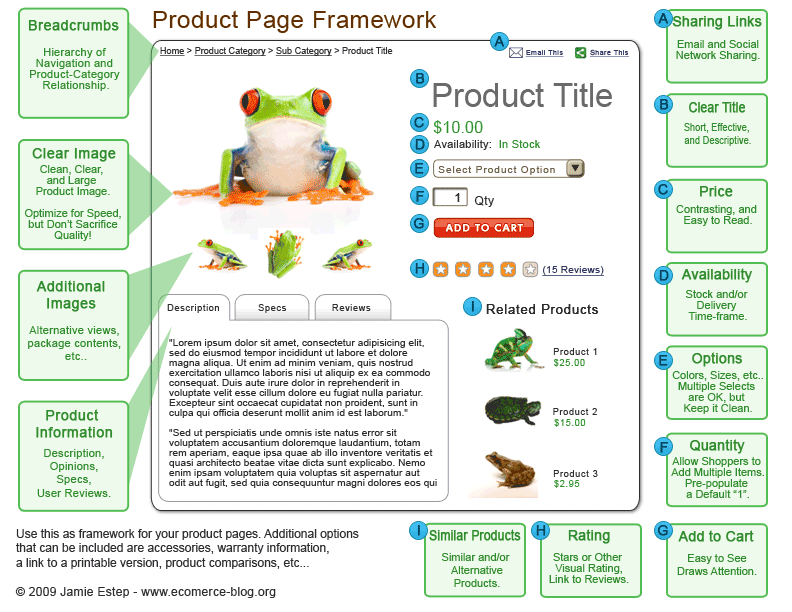
Enhancing the Ecommerce Product Page Efficiency

Before we highlight Best Practices for Product Page of an Ecommerce Website, it will be interesting for you to visit our two previous posts; the first was on best practices incorporate with Ecommerce Web Design, and the second was on Ecommerce Website Promotion. This is the third one, which is also associated with ecommerce best practices, and I am sure it will be helpful to the ecommerce web designers, online retailers and ecommerce SEO professionals. When we picked a particular PRODUCT PAGE from the product-listing page, there were two goals in our mind, to keep existing customers and to engage new customers. If we concentrate on the areas or items that enhance the efficiency of product pages, then it is easy to convert the visitors into buyers.
To increase the USABILITY, see how it is worth to add or improve the following Product Management Features on the ecommerce product page,
  • Stock Levels: Make sure to display the level of stocks you have in your store e.g. 'items in stocks', 'in stocks', etc.  if you cannot indicate this to the product page, then for the customer who already put an order for that product will have to wait for your response, and afterward you have to apologies by sending an email that product is out of stock, which creates a bad impression of your ecommerce store.
  • Use of Images: These are necessary, one of the most significant elements in a shopper deciding on whether they will buy. Ensure product imagery is lavish, of proper size, very good quality and indicates the product in various outlooks.
  • Demonstrate product using Videos/Images: Include as many as you can, each image or video you can supplement for your products provides you more chances of being found in search engines and imparts customers an extreme visible walk-through of your end products before they purchase.
  • Ability to zoom the images: Consistently enable your product images to be enlarged and make sure the enlarged version is in fact larger. You will be surprised of the lot of eCommerce websites that uses the same image for both the image outlook at product page and the zoomed image.
  • Utilize Multiple Tabs: It is prominent in secure your product pages don't look too littered, but at the same time, show all the vital information that the consumer might wish to go through in addition to delivering the search engines something large to crawl. Find out more about CSS or jQuery, it is likely to show a tabbed area which could be cast off to break up information such as description, reviews, specifications, etc. and by doing so, make sure it does not influence the design and layout of your product pages.
  • Display Everything: In spite of you believe it is not related, show it! What you might think over worthless information could rightly be vital essential for one of your shoppers. The more substance the better, break it up into relevant areas like utilizing the tabbed method above, for instance.
  • Related Product list: Mention related products on product pages so that if a specific product doesn't go with the precise needs of the shopper, they can outlook close and related products that may be what they are looking for.
  • “Add to Cart” Button: This is immense. Be sure that your “Add to Cart” button is extremely noticeable. Test different sizes and different colors to see, which performs best for your ecommerce site. Make sure it is positioned toward the topmost of your product page and not at underneath.
  • “Buy Now” Button: Ensure each product has a “Buy Now” button. Make the button large enough that customers can view it, but not too large that it vies with the product image.
  • Customer Reviews: Let customers to leave product reviews and be honest, show them all, in spite of, they are bad reviews - honesty and clarity go a long way in eCommerce. It is better to approve an unsatisfactory review but explain to it with a justification.
  • Voting: Allow your consumers to vote your products up and down, this provides other consumers an excellent idea of the level of acceptable your product range has and would enable consumers to sort them by popularity too.
  • Rollovers: Think about rollovers, which can show extra information to the customer (which retains them an additional click through to the page). This could be at a category level when observing products in a list which when turned over displays a tool-tip showing sizes that the product is stored in, for instance.). This could likely be used for images at the product page while rolling over the images that zoom the image to show in considerably closer detail.
  • Social Links: Make sure to contain links to “like” functionality as it helps share your product to the visitors' Facebook wall, and other relevant social media accounts.
  • Warranty information: Containing a powerful warranty program will put consumers at ease. E.g., Offering Lifetime warranty is very beneficial.
You can quickly quote here to get more advice to optimize your existing or pre-launched product page.
We schedule best practices on shopping cart and checkout around next week.

Four Ecommerce Best Practices for 2011 – II

Hope you like Four Ecommerce Best Practices for 2011 – I, if you have gone through. It contains best practices for ecommerce website design (index page, global, customer services) to increase the conversion.
This is the second part, and it is all about the best practices for ecommerce website promotion - on-site and offsite. Many times, you may have heard about the terms, Ecommerce Marketing, Ecommerce SEO, SEO tips for Ecommerce Site, etc. This post is exactly focusing on the areas that are directly or indirectly responsible for the promotion of an ecommerce website. I have determined some areas that can best fit into the category of Marketing and Technical.
Best Practices for E-commerce Website Promotion:
  • Marketing
  • Technical
Let’s start with first,
Marketing (off site):
  • Landing page creation – You can create and optimize landing pages for each category or each primary keyword that best described your products, which will especially help in your PPC campaign as well.  You can after analyze which pages have most conversion.
  • Targeting keywords for your products – This is truly difficult part for any site owner. You can use keyword research tool and identify the best suits of keywords for the products, whether it could be the short tail or long tail. You can also use the synonyms of the keywords based on Latent Semantic Method, which describe to contain keywords related to a particular keyword, e.g. Ecommerce, E-commerce, Electronic Commerce, SEO, Search Engine Optimization, etc.
  • Set up a blog to the site – Why is it necessary to have a blog for an ecommerce website? The answer is to gather the people of having interested to find more information, resources about the products or services, which you are selling. Post at least once in a week in the blog with the targeting keywords in titles and the content. Make sure your blog post title should be attractive. You can even link out from the blog post to the top category, landing or product page of your ecommerce website.
  • Follow up surveys – Send out the survey forms to your existing customers to know their behavior about your ecommerce website, products and services.
  • Send an email newsletter – This is the best and affordable way to keep communicating with your existing customers via sending the newsletter, which includes the promotional offers, coupons, discounts, etc. Even you can highlight the new products with their features.
  • Create Facebook page – Facebook fan page is one of the excellent way to build friends, fans for your store by the references of your existing customers. You can share the special offers also.
  • Create a Twitter account – Twitter is a micro blogging in which you can quickly announce the special offerings, introduce new products, features products, etc. to your existing customers.
Technical (on site):
  • Accessible in multiple browsers – Make sure that your ecommerce website work perfectly in all major browsers, e.g. Firefox, Chrome, Safari, and IE, etc.
  • Multiple sorting to navigation (color, size, gender etc.) – Sometimes people leave your site as they cannot able to find out the product of their choice. The best solution is to provide sorting option in the home page that distributes all the products by color, size, gender etc.
  • Keywords in title tag – Make sure to include targeting keywords and brands in the title, which are not more than 65 characters.
  • Keywords in Meta tags – Recent algorithm changes suggest that there will be no more impact of Meta description to the ranking henceforth. You can now include the targeting keywords relevant to the content.
  • RSS feeds – Two areas you can use RSS feed in your site, Product, Category page and Blog. It informs your shoppers if they subscribed to the product feed about the new product. They can also subscribe to the blog to keep updating with the products of your ecommerce website.
  • Keywords worthy and easy to understand URLs – Make sure to include keyword in your URL with underscore “_” sign. You can remove the unnecessary stings of numbers and letters from the URL so that it makes easy for human to read.
  • Image optimization – Make sure the images are in good quality and perfect in size. If you want to show a product, use jpg. For logo, you can use png or gif format.
  • Use “title” and “alt” attributes in your image – For better visibility and usability of your product image in search engines, you can use keywords in “title” tag (link source) and “alt” tag (image source).
If you have more ideas about ecommerce website promotion, you can share them in the comments.
In our next post, you will find the best practices for product pages.